TL;DR
- A good Counter-Strike 2 crosshair can be a game-changer, as it will help you aim more comfortably.
- You can import some of the most popular CS2 crosshairs using their codes.
- Make sure your CS2 crosshair is visible in different surroundings.
- If you don’t like the new crosshair, simply use the Undo option to revert the changes.
- You can use different crosshairs based on the weapon type.
- Give each crosshair a few days before switching to the next one.
Finding your perfect Counter-Strike 2 crosshair can completely change your gameplay. The right crosshair can help you gain those extra few seconds in a fight so you can aim precisely, track cleanly, and feel the confidence in those high-pressure gunfights. There are countless options and fine-tuning possibilities with your crsshair, from static lines to dots; the length, thickness, and style can all be adjusted to suit your needs.
We know it can be overwhelming to know where to start, so in this guide, we’ll break down the best CS2 crosshair settings, show you how to import pro player crosshairs, and share some tips and tricks so you can figure out what suits you best. Whether you’re a casual player or aiming for competitive play, we’ve got you covered so you can gain that edge.
Best CS2 crosshair codes & settings in 2026
While you can adjust individual crosshair settings like style, length, thickness, and more, here are some of the best CS2 pro crosshairs around the world to help you get started quickly. Then you can fine-tune them from there to suit your needs.
| Player name | Organization name | Crosshair code |
|---|---|---|
| donk | Team Spirit | CSGO-Jhfkc-4UpR6-DJftC-VfGek-pL3ED |
| s1mple | Bcgame | CSGO-m58cB-AyBDC-AV6tp-Gwq2K-QGKeB |
| m0NESY | Falcons | CSGO-wAD3c-ykt5L-zvZ98-vBisR-6sWPA |
| NiKo | Falcons | CSGO-s5Qbj-nvF89-cJjDd-mRdSG-5Yt4N |
| ZywOo | Team Vitality | CSGO-rUZB2-rVwbU-u8f7J-4yu8T-6sWPA |
| XANTARES | Aurora Gaming | CSGO-xbpe2-E24RJ-YXNuO-pQvt8-ppNAK |
| ropz | Team Vitality | CSGO-MMQuh-Hs3Sj-Qv9zd-VaCmc-3QqNO |
| b1t | Natus Vincere | CSGO-mEr3O-qc3qm-Py58r-YjQpR-Ms8rN |
| jL | Natus Vincere | CSGO-x68V4-XVQU8-KU3tY-rV5Ua-42FyB |
| Twistzz | FaZe Clan | CSGO-rAP9j-NWCBz-esDKK-SNzcw-5RGOP |
| w0nderful | Natus Vincere | CSGO-MQS69-VdhoT-Ee2E7-ycyr7-ZmRBD |
| broky | FaZe Clan | CSGO-nX4aQ-nMxvT-vWUn8-fkCTG-CuSyL |
| electronic | Bcgame | CSGO-hyGTZ-LuE7X-wAmdJ-D5wt3-9DmDA |
| karrigan | FaZe Clan | CSGO-7er9p-dWfdr-MsBpm-FxyCU-8Bu8O |
| rain | 100 Thieves | CSGO-KoKYK-eL4FP-Tj6db-Y9pAt-bciaB |
| iM | Natus Vincere | CSGO-rsDHb-QDmGE-VikD2-dApWC-kJCEB |
| FalleN | FURIA Esports | CSGO-DySAA-sWtfq-GEBcO-27WOS-cBCEB |
| device | 100 Thieves | CSGO-q6V25-QEBHr-ahOJi-bzYJO-PiKPJ |
| sh1ro | Team Spirit | CSGO-s8VZE-8fftF-TKOHV-qzbrR-TA7yD |
| EliGE | Team Liquid | CSGO-NweMb-HbLTu-TTvxf-CqHXD-yTvaL |
| magixx | Team Spirit | CSGO-meoXd-BMnXp-RUxfU-XpVPi-LwAkE |
| woxic | Aurora Gaming | CSGO-hVyt6-6w7hL-hQyc6-xReeD-3sNkO |
| apEX | Team Vitality | CSGO-US8wR-VECem-xkyHs-Vz5CY-wwXsO |
| cadiaN | OG | CSGO-qkkHe-wUdL7-HvPrQ-7q4PF-htuWK |
| flameZ | Team Vitality | CSGO-Ts59P-UHNG6-Nsnwp-eBrtF-Ln2AC |
How to change crosshairs in CS2?
While you can manually customise your CS2 crosshair through in-game settings, the easiest way is to copy a crosshair code and import it.
- Copy a code from the CS2 crosshair code list above or from somewhere else.
- Launch Counter-Strike 2 and go to settings from the top left corner of your screen.
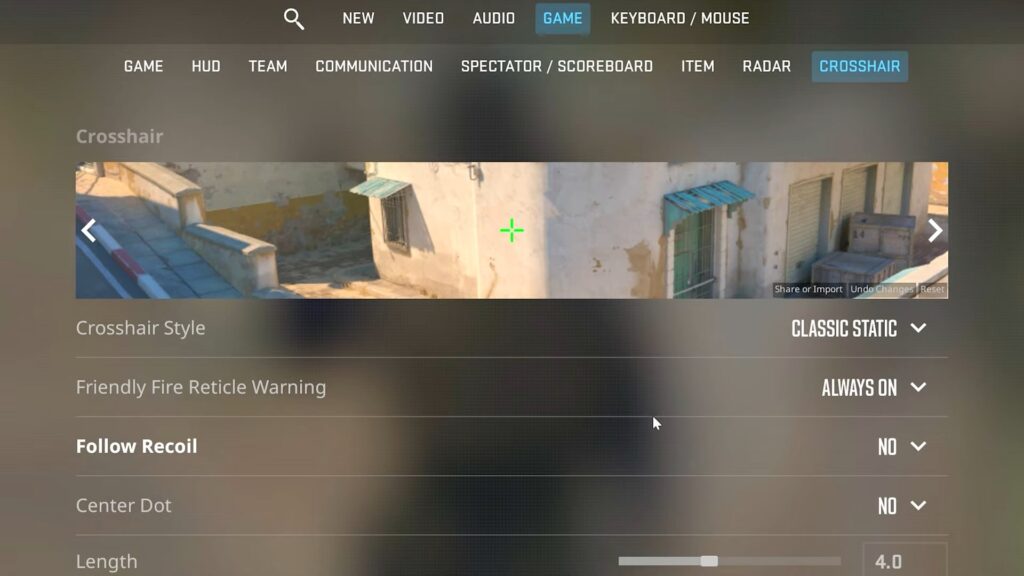
- Head to the Game section and scroll down until you find the Crosshair tab.
- Click on the Share or Import option, and a pop-up window will appear.
- Paste the crosshair code and hit the Import button. You can also share your crosshair code with someone else with the help of the Copy Your Code option.
- If you don’t like the changes, simply use the Undo option right next to Share or Import to get your previous crosshair.
Although you can also use the developer console to change your crosshair with a few simple commands, typically starting with cl_crosshair, such as cl_crosshairgap X or cl_crosshairstyle X, this can be a quick way to modify your crosshair on the fly.
All types of CS2 crosshairs
CS2 offers endless crosshair customisation, but it can be widely divided into the following categories:
- Classic static crosshair: As the name suggests, these CS2 crosshairs don’t expand or contract while shooting, making them great for beginners. The majority of players prefer this type of crosshair.
- Dynamic: Unlike classic static crosshairs, dynamic crosshairs change shape while shooting. They can help track bullet spread better and make shooting feel more satisfying.
- Dot crosshair: A dot crosshair consists of a single point without any lines and can improve precision, especially for AWPers.
- Circle crosshair: If you find it hard to see a dot crosshair, a circle crosshair is a great alternative. It offers similar precision and works well with all types of weapons, not just snipers.
- Hybrid: These crosshairs combine straight lines and a dot in the center and are among the most commonly used ones.
- Line crosshair: Featuring four straight lines, line crosshairs offer good visibility and are particularly good for spraying with rifles.
- Custom crosshairs: Many players like to carve out unique crosshair styles as per their personal preferences. These can include practically good crosshairs or purely aesthetic ones.
How to get the best crosshair for CS2
Pick the right colour
No matter which crosshair you choose, if it’s not visible due to the graphics, it will affect your aim. Choose a colour that stands out against the surroundings, and if you’re still having trouble, you can always put a black outline on the crosshair so it really stands out.
Casual/deathmatch practice
Pick a crosshair you like and test it in Casual or Deathmatch modes with different weapons. If it feels right, stick with it. If not, move on to another one.
Find your comfort
Just because a crosshair works for someone else doesn’t mean it will work for you. Focus on what makes you feel comfortable and suits your gameplay style.
Have patience
Avoid switching crosshairs too frequently, otherwise, you might never find the right one. Stick with a crosshair for a few days before making a switch.
Sensitivity changes
If no crosshair feels right to you, the issue might be with your sensitivity settings. Try adjusting them until you find the ones that help you aim calmly.
Conclusion
Choosing the best CS2 crosshair is crucial, and even a slight adjustment can significantly impact your overall performance. CS2 offers an extensive customisation system to choose from. Every player can fine-tune their crosshair to match their playstyle perfectly. While pro player crosshairs are a great way to start out, the most effective crosshair is one that feels natural over time. Take time to test it out in real matches; a well-optimised crosshair can make or break your game in CS2.
FAQs
What is a good crosshair for CS2?
A good crosshair in CS2 is what you’re most comfortable with; it needs to be visible against most backgrounds and suit your playstyle. Whether you’re more for spraying or tapping heads, it’s all about personal preference.
How to get a new CS2 crosshair?
Simply copy a CS2 crosshair code and import it by going to the game’s settings using the “Share or Import” option under the Crosshair section.
Do CS2 pros use the dot crosshair?
Yes, some pros like Jame and 1mpala use the dot crosshair as it can enhance accuracy in the long run and help improve headshot percentage. However, it tends to cause some issues with spraying, and if the dot is too small, you may have trouble seeing it.
What are the aim settings for CS2?
Most players prefer low sensitivity paired with a clean crosshair, along with raw input enabled, and a zoom sensitivity close to 1.0 to aim better.