VALORANT has announced a Twitch extension, dubbed Shotcall, allowing fans to make real-time predictions during VALORANT Champions Tour (VCT) matches.
Shotcall will first become available for the VCT Americas broadcast during four weekly beta test runs, starting on August 8th.
VCT is VALORANT’s premier esports ecosystem organised by the game’s developer Riot Games. The circuit encompasses four regions (Americas, EMEA, Pacific and China), which meet in two yearly Masters events and the season-ending VALORANT Champions tournament.
As a desktop-only Twitch extension, Shotcall enables viewers to predict the outcomes of upcoming VTC maps, rounds, and clutches. Correct calls will award points to climb the leaderboard. Moreover, participants can earn rewards based on their Shotcall performance.
Beta testers can receive one reward across the four ‘Shotcall Fridays,’ which are scheduled for August 8th, 15th, 22nd and 29th. However, Riot plans to offer ‘more exciting’ rewards during future Shotcall cycles.
Moreover, the company aims to expand the extension to more leagues and languages in the future.
How Shotcall Works
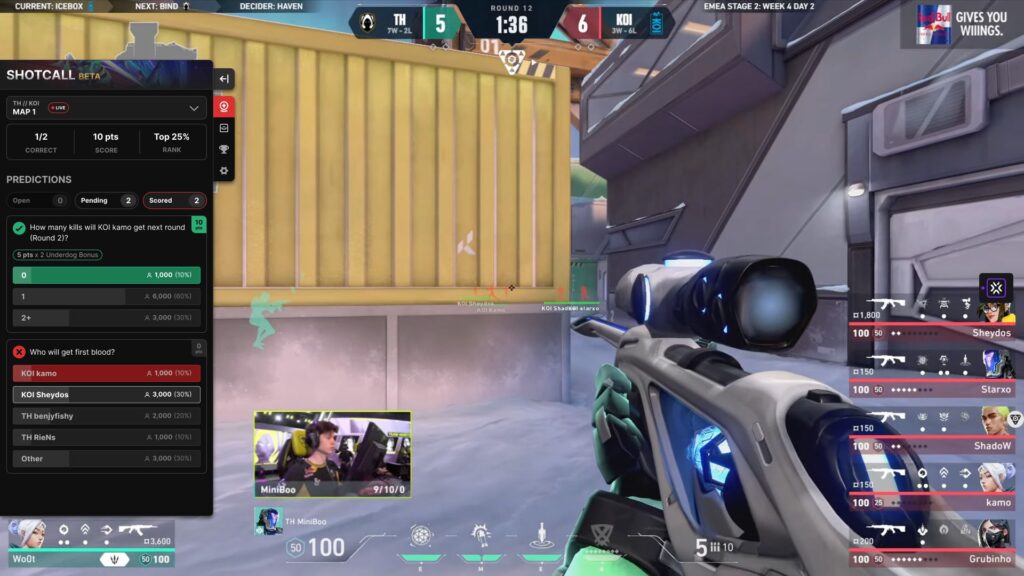
For now, VCT fans must tune into one of the three official VCT Americas Stage 2 broadcasts on Twitch to try out Shotcall:
- Find the Shotcall overlay by mousing over the video player
- Click the red crystal ball icon and log in with your Riot ID to join the game
- Make your predictions for the upcoming map, round or clutch. Predictions will fly out over the video when the extension is minimised
At the end of maps, Riot will also send out survey links to help improve the extension based on community feedback.
How to Enable Shotcall
Before making Shotcall predictions, the extension must be enabled for your Twitch account:
- Head over to an official VCT Americas Twitch channel
- Hover your mouse over the video player. Click on the red crystal ball icon, which will appear in the top left corner of the stream
- Log into Shotcall to activate it
- If Shotcall is not appearing, access the Twitch extension controls on the top right side of the video and make sure Shotcall is set to ‘visible’